
Purpose
The purpose of this article is to break down what’s involved in Storyboard creation. To highlight the best practices and why they work.
Introduction
A Storyboard is a visual tool that is used to collect and organize ideas, inspiration, and visual references for a creative project. Storyboard can include various elements, such as images, color palettes, textures, typography, and other design elements, and are often used by designers, artists, and other creatives to help them conceptualize and communicate their vision for a project.
Artstyle
The art style is an important aspect of storyboarding as it sets the tone and visual direction for the project. The art style should be carefully considered to ensure that it complements the story and effectively conveys the intended mood and emotions. Whether it’s a realistic, minimalist, or cartoonish style, the art style should be consistent throughout the storyboard to ensure a cohesive look and feel.

Assets
Asset links are important to the designers to be able to come up with scenes. These include inspirations, stock images, stock footages, Brand guides, Client images and pegs, etc.

Video Animation
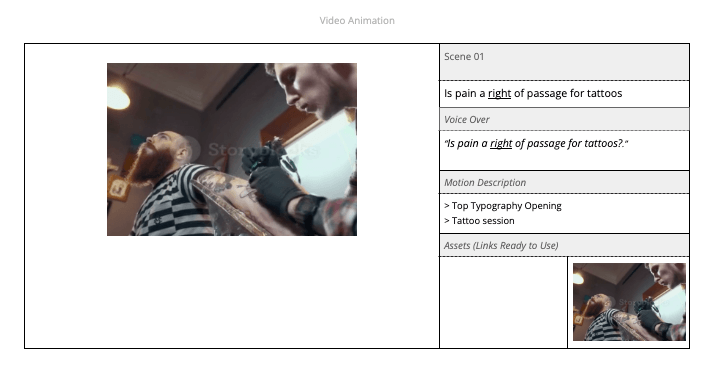
These sections contain the following:
- Scene # – refers to the order of scenes. Best practice would be in numerical order
- Voice Over – These are transcripts from the voice-over file.
- Motion Description – Describes motion direction, animation, and sound effects.
- Assets (Links Ready to use) – Collection of assets, links, usually pictures that depict the scene
The Goal
The goal is to provide the designers with a base pre-prod document
Best Practices Dos
- Link the Stylescape
- Provide screenshots from previous similar video projects
Best Practices Don’ts
- Don’t forget to link assets